Invoice to Excel converter with pay-as-you-go pricing
Upload PDF or scanned invoices and download one Excel file with every line item. Pay per page with no subscription; your first 10 pages are free.
Your first 10 pages are free. No sign-up, no card.Uploaded files and results are deleted automatically after 30 days.
See an example: one invoice in, one Excel file out
This is a sample invoice and exactly what the converter returned for it. Open the Excel file to see the two sheets before you upload anything of your own.
The invoice
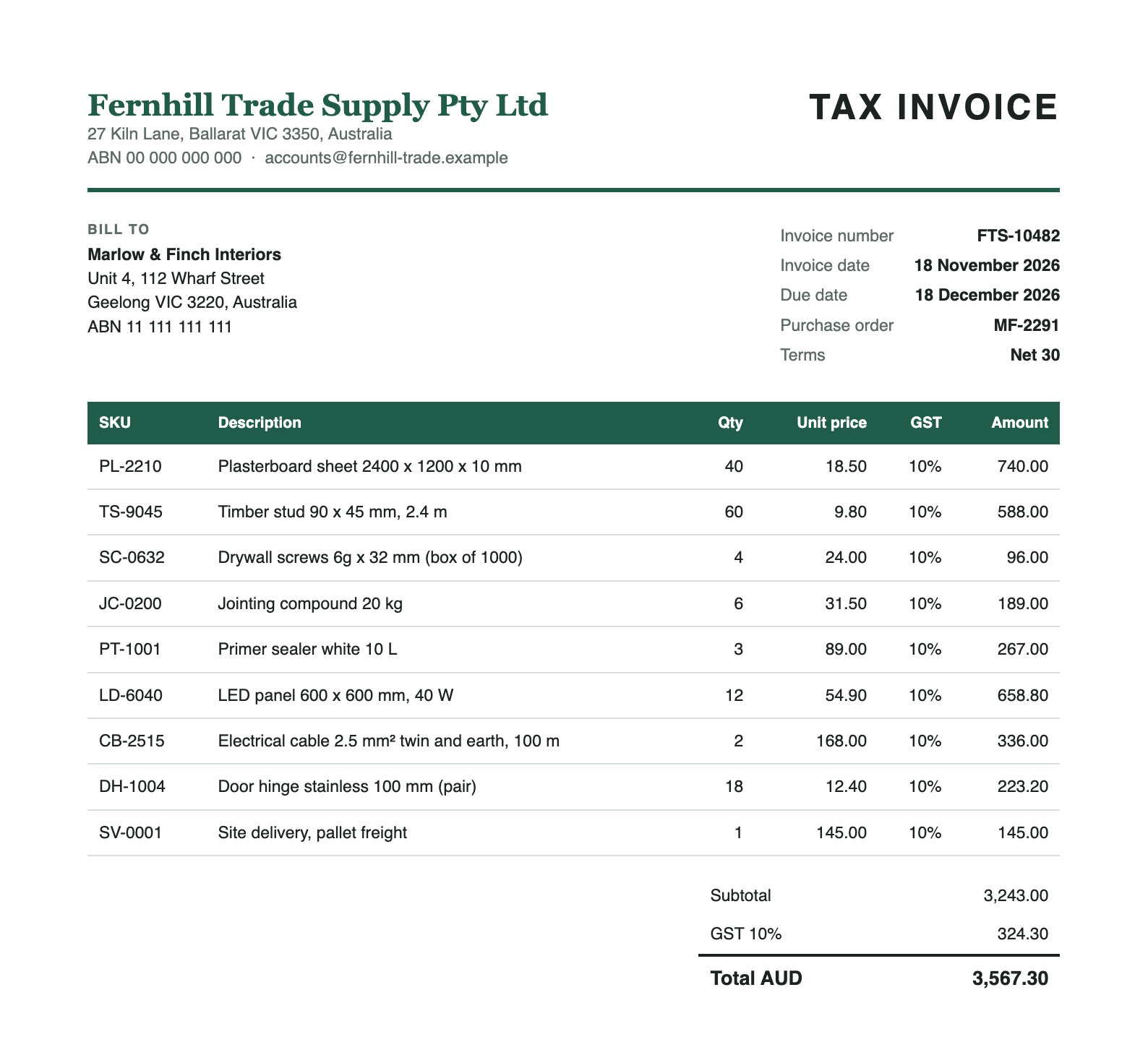
What was read
- Vendor
- Fernhill Trade Supply Pty Ltd
- Invoice
- FTS-10482
- Date
- 2026-11-18
- Total
- 3,567.30 AUD
| # | Description | Qty | Unit price | Amount |
|---|---|---|---|---|
| 1 | Plasterboard sheet 2400 x 1200 x 10 mm | 40 | 18.50 | 740.00 |
| 2 | Timber stud 90 x 45 mm, 2.4 m | 60 | 9.80 | 588.00 |
| 3 | Drywall screws 6g x 32 mm (box of 1000) | 4 | 24.00 | 96.00 |
| 4 | Jointing compound 20 kg | 6 | 31.50 | 189.00 |
| 5 | Primer sealer white 10 L | 3 | 89.00 | 267.00 |
| 6 | LED panel 600 x 600 mm, 40 W | 12 | 54.90 | 658.80 |
| 7 | Electrical cable 2.5 mm² twin and earth, 100 m | 2 | 168.00 | 336.00 |
| 8 | Door hinge stainless 100 mm (pair) | 18 | 12.40 | 223.20 |
| 9 | Site delivery, pallet freight | 1 | 145.00 | 145.00 |
| Sum of rows matches the invoice | 3,243.00 | |||
The sample costs no pages. Results depend on the document: check flagged invoices by hand.
How it works
- 1
Upload your invoices
Drop in as many files as you like: PDFs, scans, or photos saved as JPG or PNG. You see the page count of each file before anything is charged.
- 2
We read every page
Each invoice is read into its header fields (vendor, customer, invoice number, dates, currency, subtotal, tax, total) and every line item.
- 3
Download one Excel file
All the files you converted go into a single .xlsx: one sheet with a row per invoice, one sheet with a row per line item.
What is in the Excel file
One workbook for the whole batch, with two sheets you can filter, sort and paste into your accounting import.
Sheet 1: Invoices
One row per invoice: file name, invoice number, invoice date, due date, vendor, vendor tax ID, customer, customer tax ID, currency, subtotal, tax, total, amount paid, amount due, and the number of line items.
Sheet 2: Line items
One row per line: file name, invoice number, vendor, line number, SKU, description, quantity, unit price, tax rate and amount.
Built-in checks, so you know what to look at
Rows that do not add up are flagged
For each invoice we add up the line amounts and compare the sum with the subtotal and the total. When they differ, the invoice is marked on screen and in the Check column of the Excel file.
Unclear cells are highlighted
When a field or a line could not be read with confidence, it is listed and highlighted in yellow in the Excel file instead of being filled with a guess.
Ambiguous dates stay as written
A date like 03/04/2026 can be March or April. It is kept exactly as it appears on the invoice, and only unambiguous dates are converted to YYYY-MM-DD.
Pay per page. No subscription.
One page of a PDF, or one image, is one page. Pages you buy never expire, and nothing renews by itself.
| Pack | Price | Per page | Terms |
|---|---|---|---|
| First 10 pages | $0 | Free | No sign-up, no card. Full results and the full Excel file. |
| 60 pages | $5.99 | About $0.10 | One-time payment. Pages never expire. |
| 200 pages | $14.99 | About $0.075 | One-time payment. Pages never expire. |
Buy a page pack. If a file can’t be read, its pages go back to your balance.
What it reads
- PDF invoices with selectable text, and scanned PDFs that are images of paper.
- Photos and scans saved as JPG or PNG.
- Files of up to 20 pages and 10 MB each. Split longer PDFs first.
- Invoices in languages other than English: descriptions are kept in their original language.
- Handwritten invoices may need checking by hand.
- PDFs locked with a password can’t be opened. Remove the password first.
Questions
- Do I need an account?
- Not for the first 10 pages: upload, convert and download without signing up. To buy a page pack you sign in with Google, so that your pages stay with your account.
- Is there a subscription?
- No. Page packs are one-time payments, and the pages do not expire.
- How are pages counted?
- Every page of a PDF counts as one page, and every image counts as one page. The count is shown next to each file before you convert it.
- What happens to my files?
- Files are sent to an AI model to be read, and are stored so you can download the result. Uploaded files and results are deleted automatically after 30 days.
- Can I convert many invoices at once?
- Yes. Add as many files as you have pages for; they all go into the same Excel file.